
What Is a Guest Check Program? Guide for Restaurants and Cafes
A guest check program keeps the order in a digital record instead of on paper and links every step from the kitchen to payment. In this guide we clear up what a guest check is, how restaurants and cafes use the program day to day and how to set one up.

What is a guest check program?
A guest check program (called an adisyon program in Turkey) is the software where a restaurant or cafe opens an order, updates items and amounts, sends it to the kitchen or bar and closes it at payment. Put simply, it does the job of the paper check pad digitally, in a single record you can report on. On the guest check software product page, Ritapos shows this flow together with orders, stock and reports; this article goes deeper into the concepts and everyday use.
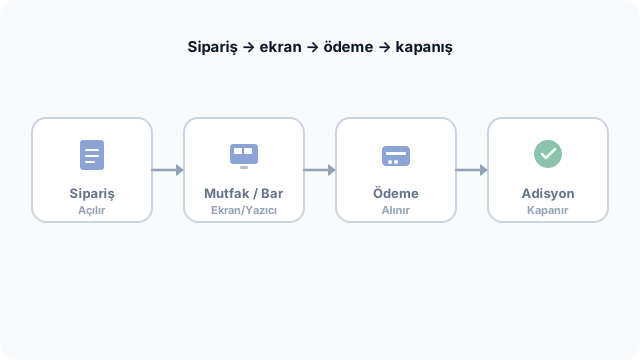
In Turkish the same need also goes by POS system, restaurant order program or cafe check program. The name matters less than the result: the order lands in the right record, staff can carry on from the same screen, and the numbers add up at the end of the day.
What is an adisyon (guest check)?
An adisyon, or guest check, is the order record that lists the items or services served by type and quantity. The list of items you see while the guest is seated, or when they ask for the bill, is the check. The order can still change until payment is complete, so a check is a live document, not an archived invoice.
Its electronic counterpart has its own framework, covered in the e-Adisyon guide. A guest check program is the application layer that manages this record inside the business; the fiscal document is completed at the payment step by the cash register or the e-document process.
Guest check, receipt and invoice: what is the difference?
| Document / record | When? | Role for the business |
|---|---|---|
| Guest check | While the order is taken and throughout service | Operations, kitchen, table tracking |
| Information slip / bill summary | Before payment | Transparency for the guest |
| ÖKC (fiscal payment recorder) receipt / e-Archive (e-archive invoice) | At the moment of payment | Fiscal record |
What does a guest check tracking program do?
A guest check tracking program shows who opened each order and at which table or through which channel. Delivery platforms, pick-up and dine-in orders all flow into the same end-of-day report, so there is no gap between "just the cash in the till" and your real revenue.
- Open tab tracking by table or name label
- Product notes, variants and portion choice
- Automatic routing to the kitchen display or printer
- Discount, complimentary item and garsoniye (service charge) rules set in the system
- End-of-day and product-level sales reports
For table-heavy service and coursing, look at the restaurant POS system scenarios; for a fast counter, see the cafe POS page. The basic concepts are also summarized in what is a POS system.
Table check program and till flow
A table check program lets the waiter enter orders from a tablet or phone, and the status of each table (free, occupied, bill requested) reads straight off the floor plan. A till check is the model for delivery, pick-up or a self-service counter: you add the items and take payment on the spot.
A good guest check program runs both from the same menu and price list. A price change made on the menu applies the same day in the dining room and on delivery, and when you add the QR menu, guests see the same prices too.
Mobile ordering and the kitchen line
When the order reaches the kitchen on a screen or a thermal printer instead of a handwritten slip, service speeds up and misread tickets become rare. The mobile order app and order management pages show how Ritapos sets up this line.
How do you set up a guest check program? Setup steps
"How do I build a guest check program?" is rarely a question about software development. Usually it means getting the right setup in place inside your business. The suggested order:
- Menu and prices: Categories, products, variants (size, milk, extras) and prices with the correct VAT.
- Floor and channels: Table plan, delivery integrations and pick-up settings.
- Kitchen routing: Which product goes to which screen or printer.
- Payment: Cash and card rules; where possible, cash register POS integration so the amount goes to the device automatically.
- Staff and permissions: Waiter, cashier and manager roles, plus who can void and who can discount.
- Reporting rhythm: A calendar for end of day, product sales and stock counts.
A cloud-based guest check program needs no server installation; signing in from a browser or the app is enough. On the hardware side, the choice between a tablet, a PC or a cash register depends on the size of the business, and the POS system page sums up the packages.
Moving from paper checks to a program
A paper pad looks cheap, but it is weak on end-of-day totals, leaves no trail of voids and makes comparing branches hard. When you switch, keep the menu simple in the first week, bring staff in with short training sessions during their shifts and run a "trial service" before the rush. Each of these takes friction out of the change. The article on POS software selection mistakes is a reminder of how rushed decisions hit day-to-day operations.
Linking checks to stock and cost
Once check data is combined with stock and cost, you can see which products really sell and which ingredients run out early. For that link, read the restaurant stock management and waste control guide.
Daily use: restaurant, cafe and delivery
The first job of the day, at opening, is checking that the menu and prices are right. In the lunch rush the waiter enters orders from the tablet and the items appear in sequence on the kitchen display. When the bill is requested, last-minute additions can still go on before the check closes, which ends the tear-up-and-rewrite routine of paper checks. At dinner, in restaurants that serve in courses (starters first, then mains), several sends from the same table are gathered under one check.
In a cafe the loop is shorter: a latte ordered under a name is opened at the till or on the barista screen, and the guest is called when it is ready. An order coming from a delivery platform lands in the same check tracking program; the kitchen sees which channel it came from, and the till reads the breakdown by channel at the end of the day. The delivery integrations page summarizes how these channels connect.
The manager and owner screen
During service, the owner or manager can follow the number of open tables, the average check and any voids from their phone. An unusual rise in voids points to a training or permissions problem. When the end-of-day report can be read in one panel without exporting it to Excel, the weekly meeting gets shorter.
Common mistakes

- Publishing the menu before training, so staff are slow on day one.
- Opening without setting up kitchen routing, so orders go missing.
- Entering payments by hand without integration, so the check and the receipt don't match.
- Leaving every discount open to everyone, which weakens margin control.
- Never switching on the stock module, which leaves you blind on cost.
Most of these mistakes come from process, not software. The article on switching to an order tracking program discusses timing for a small business.
Who should use a guest check program?
A small kiosk with one till and a hundred-table restaurant draw on the same software family; the difference is the package and the number of devices. If you have more than fifteen open tables a day or delivery orders coming in at the same time, a paper check operation usually jams. In a multi-branch setup, a central menu and central reporting become a necessity, and franchisor solutions are built for needs at that scale.
Feature set: what should you look for?
| Feature | Restaurant | Cafe | Why it matters |
|---|---|---|---|
| Table map | High | Low | Floor occupancy and bill tracking |
| Variants / notes | Medium | High | Drinks and allergens |
| Kitchen display | High | Medium | Prep sequence |
| Delivery channel | High | High | One report |
| Stock / recipes | High | Medium | Cost |
| Cash register integration | High | High | Matching totals |
The list looks long, but the decision boils down to this. If tables carry most of your service, a table check program and kitchen routing are a must; if self-service dominates, till speed and the variant screen come first. For businesses that run both, choosing a single check tracking program keeps all the data in one place.
Sample scenario: a mixed service day
Saturday night: the dining room is full, delivery orders have picked up and one table wants to merge bills. In the guest check program, merging tables or moving a bill happens on the record, so you can see who stepped in and when. On the delivery side, platform commission shows separately in the report, and at close the cash and card split is checked against the cash register report. With integration, card payments match automatically and no manual close is needed.
When service ends, the manager opens the product sales report: the day's best-selling menu item, voided products and the garsoniye total all read on one screen. That data makes a small but useful correction to the next day's supply order. Doing the same analysis from paper checks takes hours, and a single slip throws it off.
You can follow a similar operating flow across different channels in the article on taking orders from guests. For product categories and how variants work, the product and variant guide is a useful read.
The legal and fiscal side (general overview)
A guest check program does not on its own meet your fiscal obligations; the fiscal payment recorder and e-document processes run separately. Whether your business falls within the scope of e-Adisyon depends on announcements from GİB (Turkish Revenue Administration). For the current framework, see the e-adisyon solution page and the e-Adisyon guide. This article is not legal advice; confirm with your accountant before you act on it.
How each role uses the program
Waiters and the floor team
The waiter opens the table, picks products from the categories, adds notes and variants and sends the order to the kitchen. When another guest joins the table later, their items go on the existing check, with no need to start a new slip. Once the bill is requested the table status updates, and payment can be taken at the till or on the waiter's device. Three rules to stress in training: the right table, the right portion and the allergen note that must never be skipped.
Till and payment
Till staff list the open checks and apply split payments or different payment types. If cash register POS integration is active, the amount goes to the device automatically and the risk of keying in the wrong figure drops. At the end of the day, the till checks the system report side by side with the device's Z report. Small differences between the cash count and the system's cash sales should be recorded.
Kitchen and bar
The kitchen display lists products in prep order, and the bar side picks out the drinks. Marking items as ready (bump) makes service delays measurable. At peak times, printed tickets and the screen can be used together, with the screen as the main source and the printer as a backup.
Management
The manager handles menu prices, promotions and the permissions matrix. In the weekly meeting, product sales, the void rate and the average check get reviewed. When something looks off, question the process first and the software second; most deviations come down to training or permissions.
Continue in the Academy
If you would like to see this step by step on screen, take a look at the related lessons in Ritapos Academy.
Product details: guest check software.
Related page: restaurant POS system.

Frequently Asked Questions
What is a guest check program?
A guest check program is the software a restaurant or cafe uses to open an order digitally, link it to a table or the till, send it to the kitchen and close it at payment. Instead of a paper check pad, it keeps the product, quantity, price and payment status in one record.
What is an adisyon, and is it the same as a receipt or an invoice?
An adisyon (guest check) is the order record of the items or services served, by type and quantity; it is the document both sides agree on before payment. The retail sales receipt or the e-Fatura/e-Archive (e-invoice/e-archive invoice) document is issued at the payment and fiscal close step. For e-Adisyon, see the e-Adisyon guide.
Is there a difference between a table check program and a till check?
Within the same check tracking program, table service runs through the waiter or a tablet, while delivery and pick-up run through the till screen. All the data ends up in one pool.
Does a guest check tracking program cover stock and reports too?
Restaurant-focused guest check programs often offer recipes, stock deduction and end-of-day reports on the same platform. For details, see the restaurant stock management guide.
How do you build or set up a guest check program?
You define the menu and prices, set up the table or till flow and the kitchen routing, add cash register integration if needed and train your staff. Cloud solutions need no server installation.
Take the First Step for Your Business's Future
14-day free trial. No credit card required. Cancel anytime.