
What Is a Kitchen Display System (KDS)?
A KDS shows orders on kitchen screens instead of paper. We cover bar vs kitchen routing and Ritapos flow.

What is a kitchen display (KDS)?
Kitchen Display System (KDS) shows orders on screen in the kitchen instead of paper tickets. When front-of-house records an order in Ritapos, lines appear on the relevant kitchen or bar screen; production staff update status.
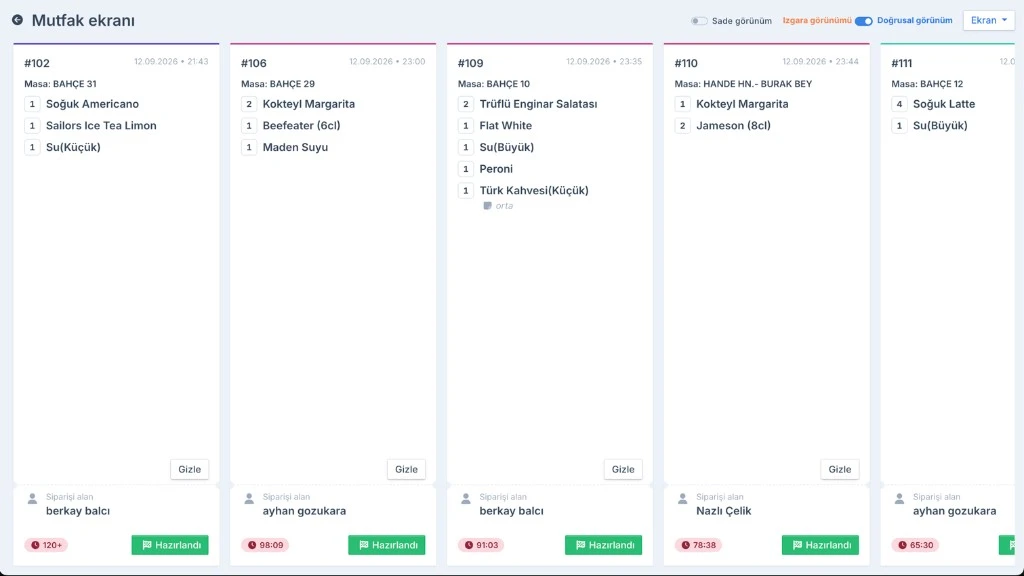
KDS is the production side of order management software. Stock deductions and sales reports feed from the same order record; lost paper and queue mix-ups drop.
How does a kitchen display system work?
Order lines route to stations by product category: hot kitchen, cold prep, dessert, bar. Each station can use a separate screen or a split view.
When a server adds items on mobile ordering, the kitchen sees them instantly; production starts without printer delay. Priority can follow table number, order time or promised delivery time.
Bar and kitchen stations
Drinks should go to the bar screen and food to the kitchen. Wrong routing pushes the barista into food and the cook into drinks and service slows.
Recipe notes for cocktails and coffee on the bar screen cut errors. The kitchen screen should highlight allergens and cooking notes.
Expo and service coordination
The expo (expeditor) checks that an order is complete before it goes to the table or takeaway counter. Lines marked ready on KDS notify the server.
On delivery orders expo checks packaging, sauces and utensils; platform cancellation rates fall.
KDS flow in Ritapos
Orders are created in Ritapos; whether they hit the kitchen before or after payment is a business setting. Triggering the kitchen after payment confirmation on prepaid delivery cuts waste.
No open lines should remain on screen at day end; open orders distort stock and turnover reports. See the general flow on order management.
Kitchen display (KDS) basics
A Kitchen Display System (KDS) shows orders on the kitchen screen in chronological or priority order instead of paper tickets. When the server takes the order in Ritapos the line drops to the kitchen; production staff update status when the item is done.
KDS is the kitchen face of order management software; stock and sales reports use the same order record. It reduces lost and unread paper tickets.
Bar and hot kitchen use separate screens; drinks go to the barista and mains to the kitchen. Wrong routing creates service delay.
Expo and quality control
The expo screen or role checks the whole order before it leaves for the table. Missing garnish or wrong portion is caught here.
On delivery orders expo checks packaging and sauces; platform cancellation rates fall. Order number labels print at the expo station.
One expo person at peak becomes a bottleneck; include the role in shift planning.
Timing and SLA
Prep time can be defined per menu item; KDS highlights late orders by color. The kitchen team sees the delayed table first.
Table merges and course order (drinks first, then food) must be entered correctly in Ritapos; if KDS shows wrong sequence the issue is in order entry.
On delivery orders ready time is reported to the platform; countdown on the kitchen screen helps courier planning.
Ritapos flow
Orders are created in Ritapos; kitchen timing before or after payment is a business setting. On prepaid delivery, triggering the kitchen after payment confirmation cuts waste.
Completed lines on the kitchen display notify the server or expo; table service coordination speeds up. Mobile server app shares the same order status.
At day end confirm no open unprepared orders remain; waiting lines on KDS distort stock and turnover reports.
Hardware and placement
Kitchen screens must survive splash and steam; mount height should be at staff eye level. Power and network cables must be secured safely.
Plan backup network or wired connection for Wi-Fi outages; paper backup for a frozen screen should be short and trained.
Multiple screens on one line can split by station: hot, cold, dessert.
Continue in the Academy
To see the topic step by step on screen, browse the related lessons in Ritapos Academy.
For the full operation see restaurant POS system and order management.

Frequently Asked Questions
Printer or KDS?
Pick one primary channel per station to avoid duplicate tickets.
How many screens do I need?
It depends on station count; at minimum split kitchen and bar. Large kitchens often split hot and cold.
What happens if the internet drops?
Plan local network and backup connectivity; short outages should have a paper backup procedure in training.
Take the First Step for Your Business's Future
14-day free trial. No credit card required. Cancel anytime.