
What Is a QR Menu and How Do You Create One? Step-by-Step
A QR menu lets guests scan a code for live products and prices. We walk through building it from your POS product list.

What is a QR menu?
QR menu means the guest scans the QR code on the table or in the window with a phone camera to reach your digital menu. Instead of printing paper menus, current prices and product lists live in the cloud; when prices change, every table sees updated content the same day.
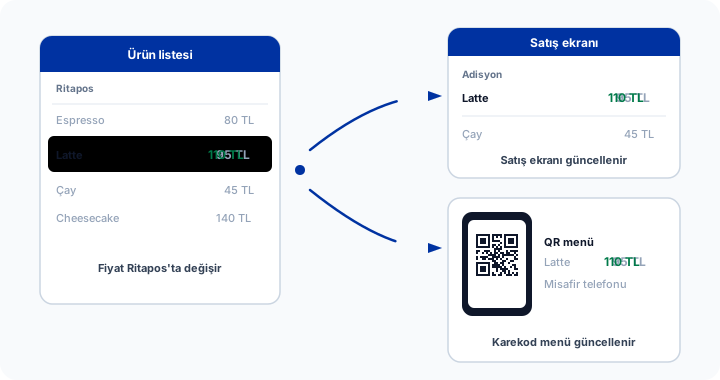
Creating a QR menu means structuring menu content digitally, generating the correct URL or Ritapos menu link, printing the code at high readability, and placing it on tables. For the technical base, see what a QR code is; for restaurant benefits, see the QR code advantages guide for restaurants.
Steps to create a QR menu
- Plan menu structure. Category order, allergens, portions and prices. Apply profitability and readability rules from what to watch when building a restaurant menu.
- Define products in Ritapos. Add selling price, VAT, stock link and images. Price changes flow to the QR menu automatically.
- Enable the QR menu. Get the digital menu link using the flow on the free QR menu page.
- Generate the QR code. Short URL, enough print size (2×2 cm practical minimum, larger is better), and M or Q error correction level.
- Match stands to table numbers. Each table can show the same menu; if order integration uses table numbers, pass them as a parameter in the QR when needed.
- Test. Scan with different phones, in low light, and with simulated scratches.
- Brief staff. Clarify how guests reach the menu and when servers step in. The QR menu lesson in the Academy walks through the steps on video.
Design and content
Photos, short descriptions and allergen icons during QR menu creation improve conversion. Very long category lists add scroll fatigue; group signature items at the top.
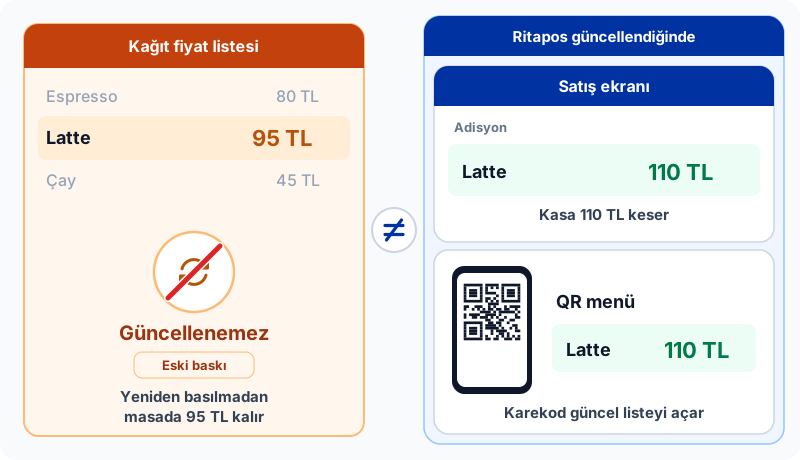
For multiple languages, define Ritapos menu translations; opening can follow the guest browser language. For items with mandatory gram weights, state portion weight on the menu.
Use wording that meets price list and consumer information rules; keep campaign copy current.
Print and stands
Mat laminate, acrylic stands and wooden holders improve durability. The last step of QR menu creation is physical placement; the stand should not sit in deep shade, and glare should be reduced.
Single-use paper QR is cheap but wears quickly; a permanent stand often costs less long term.
| Topic | Recommendation |
|---|---|
| URL length | Short link, less dense QR |
| Error correction | M or Q in the dining room |
| Updates | Ritapos price sync |
QR menu creation and brand voice
During QR menu creation, fonts, colors and photo style should match your printed menu. A dark background is easier on the eyes for evening service; a light theme suits daytime cafes.
Allergen and gluten-free wording on product descriptions must be clear; vague claims create audit risk.
Add a "campaign end date" line to your QR menu checklist; expired discounts erode trust.
Accessibility and guest experience
Keep font size large for older guests; designs that force zoom generate complaints.
Offer a paper menu backup and server help for guests without phones; a QR menu project should not remove paper entirely.
If Wi-Fi passwords are complex, guests cannot open the menu; after QR menu creation, share guest Wi-Fi with a simple password or a QR code.
Continue in the Academy
To see the topic step by step on screen, browse the related lessons in Ritapos Academy.
Visit the free QR menu page to get started.

Frequently Asked Questions
Is creating a QR menu free?
You can use QR menu on Ritapos free plan; you do not need a separate menu software fee. Print and stand costs belong to the business.
Should I remove the paper menu entirely?
Not required; many venues keep QR as primary and paper as backup. Offer paper or server help for guests without phones or older guests.
When prices change, do I replace the QR code?
No. The same code opens the same URL; content updates in the cloud. You do not need to reprint.
Can guests order from the QR menu?
Ritapos QR menu focuses on viewing; ordering continues via server or mobile ordering depending on business choice. In a QR menu project, pilot one table a week before opening and collect feedback from service staff. Heavy menu photos slow loading; optimize images.
Take the First Step for Your Business's Future
14-day free trial. No credit card required. Cancel anytime.