
What Is Cloud POS? Benefits and How It Works
Cloud POS keeps orders and reports on up-to-date servers over the internet. We explain how it differs from local install, and what to verify for security and uptime.

What is cloud-based POS?
Cloud POS (cloud point of sale) keeps orders, payments and reporting on up-to-date servers reached over the internet. Tablets, phones and PCs connect through a browser or app. Traditional on-premise POS often locks data on a back-office PC; updates and backups become your problem. Cloud guest checks apply the same idea to table and order management. Ritapos runs on this model.
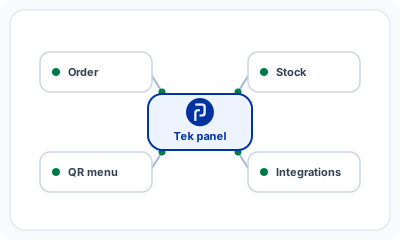
For core vocabulary read what a POS system is. Restaurant-specific flows, tables, kitchen display, delivery, are summarized on restaurant POS. Fiscal closing belongs in the same decision: see cash register integrations alongside cloud order software.
Cloud POS vs local POS
| Criterion | Cloud POS | Local / on-premise POS |
|---|---|---|
| Setup | Browser or app; flexible hardware | Server or register PC install |
| Updates | Central; all branches same version | Per-site manual patches |
| Remote access | Reports from anywhere online | Usually on-site only |
| Backup | Provider infrastructure | Owner responsibility |
| Internet outage | Needs contingency plan | Local sales may continue |
| Multi-branch | Central menu and reporting | Fragmented data risk |
How cloud guest checks work
A server enters an order on a tablet; data writes to the cloud immediately. Kitchen, bar and counter see the same ticket. Price or menu changes from headquarters propagate in seconds. End-of-day rolls up centrally; branch comparison happens in one dashboard. The same stack can connect to delivery platforms and e-Adisyon when configured.
The Ritapos cloud model
Ritapos works in browser and desktop app; server-side releases ship compliance and feature fixes without per-branch installers. Multi-site brands use central menu, stock and reporting. Track uptime and planned maintenance at status.ritapos.com.
Security and data protection
Ask vendors about encryption, role-based access and backup policy. Separate roles for server, cashier and manager; avoid shared passwords. Card data stays in PCI scope of payment hardware and banks. Ritapos handles orders; fiscal payment completes through integrated registers.
- Strong passwords or two-factor where offered
- Disable accounts when staff leave
- Branch-scoped permissions
- Limited API and integration credentials
Outages and offline scenarios
Cloud systems depend on connectivity. Plan a secondary ISP or mobile hotspot, and understand whether your vendor offers local queueing. Registers may still take payment while kitchen sync lags, document who does what when Wi-Fi drops. Subscribe to status alerts before peak service.
Selection criteria
| Criterion | Question to ask |
|---|---|
| Vertical fit | Tables, delivery, kitchen display? |
| Fiscal POS | Supported for your device brand? |
| e-Adisyon | GİB-format documents produced? |
| Reporting | Product, hour and server breakdown? |
| Support | Service-hour coverage in your language? |
| Contract | Data export and cancellation clear? |
Multi-branch and franchise
Cloud makes standard menus and campaigns one-click across sites. Variance reports show which branch drifted from the approved list. Local POS often means emailing menu files or USB walks between stores.
Cost picture
Cloud is usually subscription with lower upfront hardware spend; on-premise emphasizes license and server capital. Model three-year total cost including integrations and support, peak-hour outage can exceed a year of fees.
Migration steps
- Export menu and stock from the legacy system
- Choose a pilot branch or pilot day
- Test fiscal integration before go-live
- Train floor and counter staff
- Run short parallel operation if needed
- Cut over and archive legacy exports
Hardware independence and compliance updates
Swap a broken tablet without restoring from a local disk image. When e-Adisyon or tax fields change, cloud vendors deploy server updates, you are not shipping XSD files store by store. Local lag creates compliance gaps.
Reporting and integrations
Owners review open tables and revenue away from the venue. Delivery marketplaces, loyalty and accounting hook through APIs with centralized logs, easier than debugging scattered register files. Map Wi-Fi coverage for tablets and kitchen screens; weak spots cause silent delay. Reconcile cloud order lines with fiscal slips daily when you accept cards, cash and meal vouchers.
When local POS still makes sense
If connectivity is unreliable with no backup option, or regulation mandates on-site-only storage, evaluate on-premise. Most urban restaurants pair cloud with a secondary line.
Contracts, privacy and realistic demos
Before you sign, clarify support hours and SLA in the contract, a Friday-night outage can cost more than a year of subscription. Ask where data is processed, which subprocessors apply, and how you export history in CSV or API form if you ever switch vendors. Under Turkey's personal data rules, a data processing agreement should name retention and breach notification.
Trial the product during a real service peak with your full menu, not a sandbox demo list. Map Wi-Fi for every tablet and kitchen screen; backup LTE should cover the floor, not only the counter. If stock modules deduct recipes from sales, measure sync delay so the kitchen does not cook against stale counts. Read release notes when e-Adisyon or tax fields change, and brief managers even when updates feel invisible.
Conclusion
Cloud POS centralizes hospitality data; Ritapos offers browser and app access, branch control and steady updates. Choose together with fiscal integration, e-Adisyon readiness and outage playbooks. Test data export early, clarify SLA support hours, and run demos under real Friday volume, not a toy menu.
For concepts see what a POS system is, for restaurant features restaurant POS, and for fiscal links cash register integrations.

Frequently Asked Questions
Is cloud POS secure?
With the right provider and access control, enterprise-grade security is possible. Review the contract and technical documentation.
Does sales stop when the internet drops?
Order flow may pause; backup links and procedures matter. Payment at the register might continue while kitchen sync catches up.
Who owns the data?
Your contract should define ownership and export rights before you sign.
Is migration hard?
With clean menu data and integration testing, many venues move in a few weeks.
Is Ritapos desktop or cloud?
Both interfaces connect to cloud servers; data lives in the data center, not on a single till disk.
Take the First Step for Your Business's Future
14-day free trial. No credit card required. Cancel anytime.