
What is QR code error correction?
Even if a QR code is scratched or stained, error-correction algorithms can keep it readable. We cover L, M, Q and H and which level to choose for cafe, restaurant and QR menu stands. We go a bit technical, but if you do not care about the tech: Q is fine :)

What is error correction?
We are skipping the "what is a QR code" primer. Have you ever wondered how phones read codes that look so badly worn, so quickly? One of the strongest features of QR codes is error correction. Even if part of the code is scratched, stained, poorly printed or worn at the edge, a phone can often still read it and open the menu.
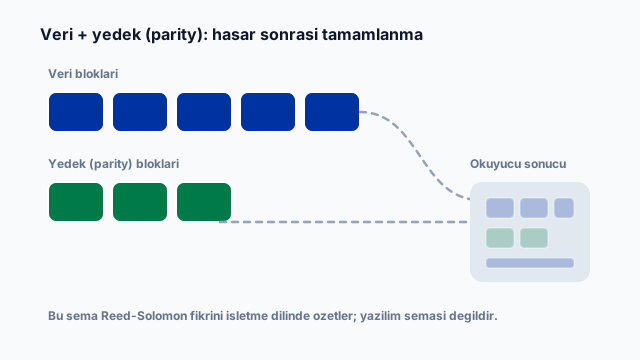
That mostly works thanks to a Reed-Solomon error-correction algorithm. When the code is generated, spare (parity) data is added. Your phone uses that spare data to fill gaps when it sees damaged modules. For a restaurant, the practical result is clear: a table-stand QR can still work even when the print no longer looks perfect. The algorithm that tolerates daily wear and saves reprint cost works well when used correctly, but error correction is not magic; if finder patterns are wiped out or most of the code is unreadable, scanning fails no matter which error-correction level you chose.
Four levels: L, M, Q, H
The QR standard defines four error-correction levels. You pick the level in print software or a QR generator; the menu URL can stay the same while the matrix changes. Each level describes roughly how much of the code can be damaged and still be recovered:
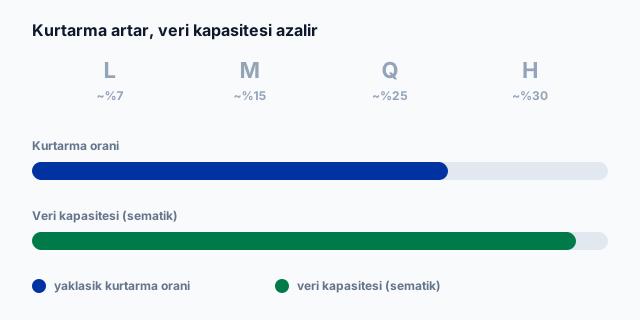
- L (Low): about 7% recovery; more data fits, less toughness. Fine for clean, short-lived prints.
- M (Medium): about 15%; a balanced everyday choice. Most cafe and restaurant stands start here.
- Q (Quartile): about 25%; preferred on surfaces with wear and glare risk. Common under acrylic stand covers.
- H (High): about 30%; most redundancy, densest or largest layout. Consider it for industrial labels or heavy-wear cases.
What changes as the level rises?
Higher levels spend more of the code on parity. The same menu URL becomes denser, or needs a larger print for the same readability. That is why "always use H" is not the right answer: a short link on a clean stand often works with M; if the print scratches easily or sits on costly material, Q is safer. Generate the same menu URL at different levels and you can see the module density change with the naked eye.
Which level for restaurants and QR menus?
A QR menu lets guests scan a table code and reach live products and prices. With a cloud menu such as Ritapos you do not reprint when prices change, but the physical stand still gets scratched, stained and hit by light. Error-correction level protects that physical side.
On table stands, QR codes gather dust, get scratched or suffer light glare. For restaurant menus, M or Q is usually right. With the right level, part of the code can fail and the menu still opens. See how QR menus are set up in the venue on the free QR menu page.
Cafe, restaurant and outdoor differences
Busy counter cafes pass stands from hand to hand; oil and fingerprints build up fast. Full-service restaurants keep stands more still, but cutlery and glassware still scratch them. Terraces and window seats add sun and glare. The same brand may use M indoors and Q outdoors or under acrylic covers.
If the code is printed on costly material that wears quickly (laser-etched plate, wood or metal), Q is the better choice. Remember that higher recovery also means denser modules, and very small prints can become harder to focus. Shrinking the stand while raising the level can make focusing harder; size and level should be chosen together.
We cover operational upsides of QR for restaurants in what QR codes are and how restaurants benefit.
Common damage scenarios
When a guest scans and nothing opens, the experience drops. They tilt the phone, fail to focus or see an invalid-code message; the first moment before ordering is broken. Table QR codes often face:

- Scratches or cut marks
- Oil, sauce or fingerprint stains
- Faded or low-quality print
- Creased, torn or curled edges
- Bad angle, shadow or acrylic glare
Error correction steps in here: even if part of the code is damaged, the menu can still open. Operations keep moving; staff do not need to reprint every stand after light wear. In a busy service, guests reach the menu without waiting for a waiter; an unreadable code wastes both speed and the digital-menu investment. Periodic checks still help: testing one stand on open or close is faster than waiting for guest complaints.
What to watch when choosing a level
Higher ECC does not always mean easier scanning. An overly dense code on a small stand or blurry print makes focusing harder. A short menu URL, the right level and a clean print give the best result in most cafes and restaurants.
Look at stand material, print size, lighting and how often you replace the code. Test at the table with your phone and one or two other models; a code that works under office light can fail on the floor. Plastic stands with frequent touch suit M or Q; disposable paper or large prints may work with L or M. On branded, colored or low-contrast designs, raising ECC one step also improves scan safety, because decoration can act like "damage".
Quick decision
For table-stand QR menus, default to M; choose Q when wear or costly surfaces raise the risk. Use H only when you expect heavy damage and can print larger. Pick once and apply the same level across branches to cut inconsistent prints and support load. Every stand then shares the same scan safety.
Menu content updates in the cloud; your job is to keep the stand readable. A short menu link, enough print size and the right ECC work together. See the free QR menu flow on the Ritapos QR menu page.
To see how QR menus work in the venue, open the free QR menu page.

Take the First Step for Your Business's Future
14-day free trial. No credit card required. Cancel anytime.